Headless Craft CMS with GraphQL and React, Part 5: Adding Pagination
December 3, 2025
In Lesson 3 we populated our homepage with a list of recipe entries pulled in from our Craft CMS backend, but right now every recipe entry in the entire channel is being populated at once. That's fine when we only have a handful of entries, but as our site grows that listing is going to start to get unwieldy. We're going to add simple pagination to incrementally load more entries as needed using some built-in Apollo Client features.
Add a Limit and Offset Variable to the GraphQL Query
Just like in a Craft Twig query we can specify a limit parameter to only return a certain number of results. Unlike with Craft templates, however, Craft does not provide us with a built-in pagination function, so it's our job to roll our own on the React side. To do this we're going to pair the limit parameter with offset to dynamically pull-in new entries when requested.
Open up your /data/recipe-entries-query.js query file and add the following to the GraphQL query:
query GetRecipeEntries(
    $section: [String]
    $limit: Int # <-- add this
    $offset: Int # <-- add this
) {
    entries(
        section: $section
        limit: $limit # <-- add this
        offset: $offset # <-- add this
    ) {
        # ...
    }
}
limit and offset both accept single, number-type values, AKA integers, so we apply the Int type to both and pass them down to the entries field.
Add Limit and Offset Variables to useQuery
Now we open up our homepage component (for me this is located at /src/pages/index.js) and add the two new variables to our queryVariables object:
export default function Home() {

  const queryVariables = {
    section: ['recipes'],
    limit: 4,
    offset: 0
  }

  const { error, data } = useQuery(GET_RECIPE_ENTRIES, { variables: queryVariables });

  // ...

}
Now when we view our homepage only the first 4 entries are loaded.
Use Apollo Client Devtools to View Query Info
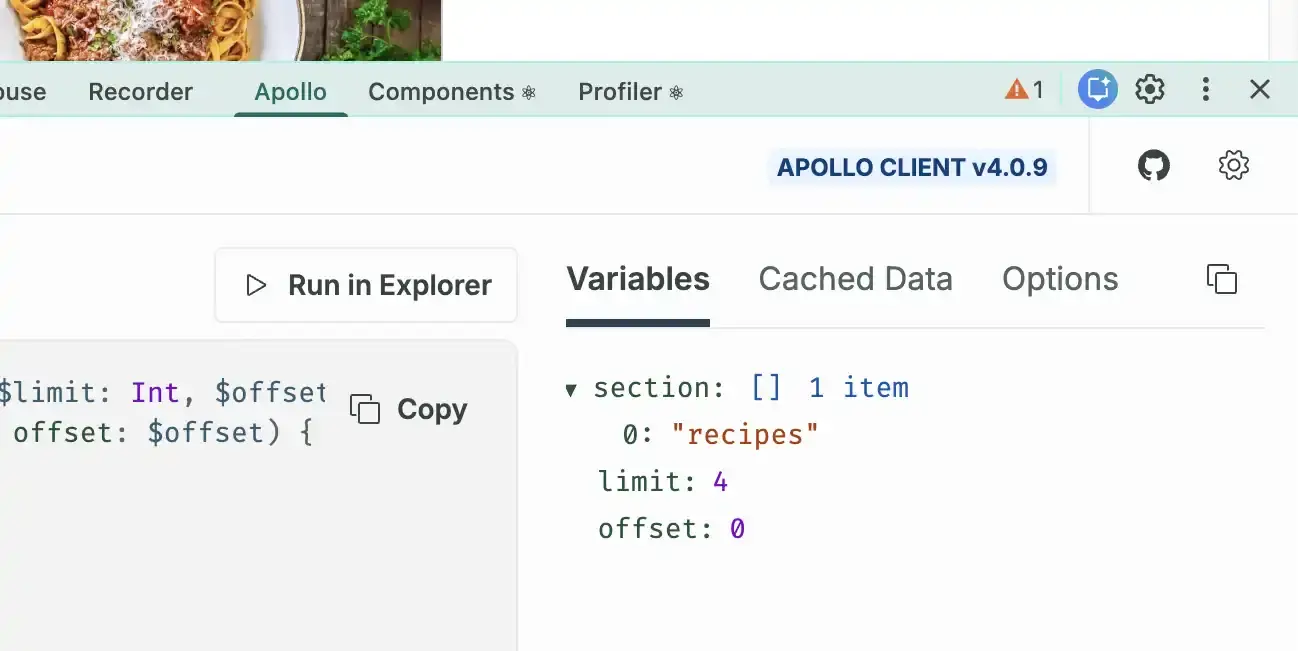
Our GraphQL queries are starting to get more complex, so it would be nice if we had a way to confirm our queries are doing what we want them to in the browser. Luckily, Apollo Client maintains devtool extensions for Chrome and Firefox. After installing, you can see a list of every variable being used for the current query:
Create a React Event Handler for the Load More Button
Instead of classic next/prev pagination I think it would be better UX to populate the new recipes at the bottom of the existing list, so we're going to replace the pagination links with a single "Load More" button.
We need a way to tell Apollo to fetch the next set of entries in the list, and Apollo provides us with a function called fetchMore to do exactly that. We can access fetchMore from the useQuery hook:
const { error, data, fetchMore } = useQuery(GET_RECIPE_ENTRIES, { variables: queryVariables });Next, we'll create a React event handler to call fetchMore when the Load More button is clicked.
const handleLoadMore = () => {
  fetchMore({
    variables: {
      offset: 4
    }
  });
}

return (
  // template html...

  <button onClick={handleLoadMore}>Load More</button>

  // ...
);
This works fine for the first click, but we need to be able to increment the offset variable dynamically, so let's create a React useRef to store the data:
import { useRef } from "react";

export default function Home() {
  const queryOffset = useRef(0);

  const queryVariables = {
    section: ['recipes'],
    limit: 4,
    offset: queryOffset.current
  }

  const { error, data, fetchMore } = useQuery(GET_RECIPE_ENTRIES, { variables: queryVariables });

  const handleLoadMore = () => {
    fetchMore({
      variables: {
        offset: queryOffset.current = data.entries.length // increment the offset while updating the ref value at the same time
      }
    });
  }

  // ...

  return (
    // template html...

    <button onClick={handleLoadMore}>Load More</button>

    // ...
  );

}
So here's the sequence of events:
- Apollo Client calls the GraphQL query using the initial
limitandoffsetvalues of4and0, respectively. 4 entries are returned from the beginning of the list. - The user clicks the Load More button and the
offsetpointer is moved to the end of the current entries list. Since we have 4 entries loaded, the offset will be updated to4. Now our values areoffset: 4andlimit: 4, so the next 4 entries will be added to the bottom of the list, giving us 8 total entries. - The next time the Load More button is called,
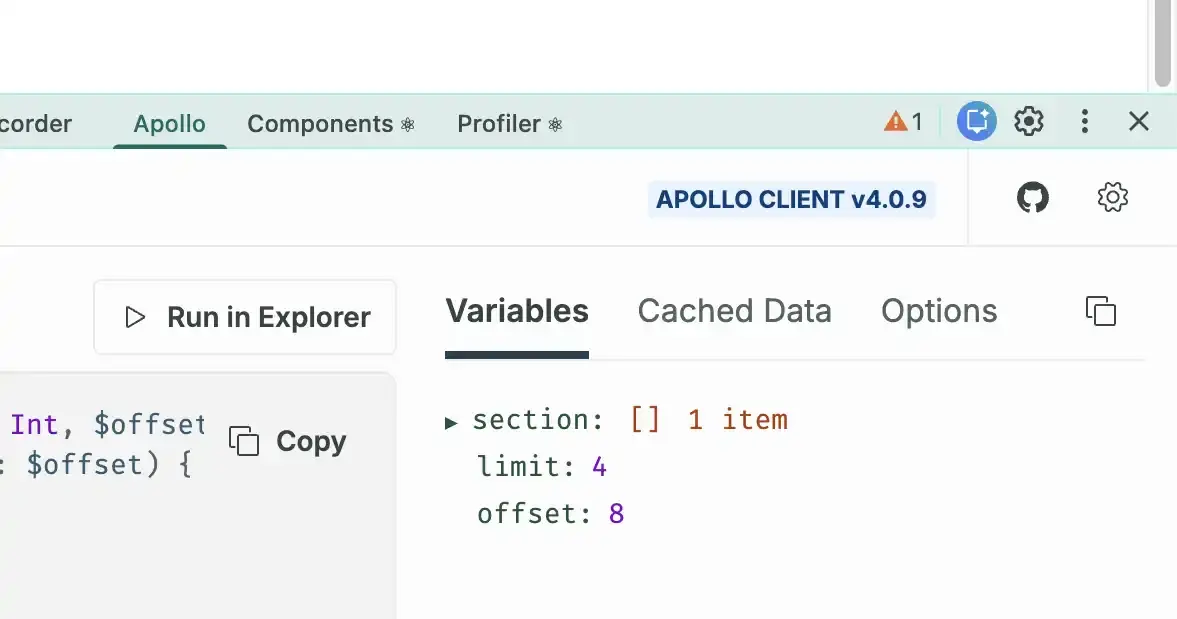
offsetwill be increased to8andfetchMorewill run again.
You can watch the offset variable increment in real time by viewing the Apollo devtools:
Create a Cache Policy to Merge Entries Into a Single Cache
Right now when we click "Load More" the new set of entries overrides the old one instead of being added to the bottom of the existing list. That's because Apollo thinks each new batch of entries is a completely unique list, so it stores it as a separate cache object. Apollo caching is a complex topic and I recommend reading the docs to get a deeper understanding of the logic behind it; but for our purposes we are going to create a custom cache policy for our query that instructs Apollo to merge all incoming entries into a single list.
Open up your query cache file at /data/query-cache.js and update it with the following:
import { offsetLimitPagination } from "@apollo/client/utilities";

const queryCache = new InMemoryCache({
    typePolicies: {
        Query: {
            fields: {
                entries: offsetLimitPagination()
            },
        },
    },
});
Remember that in GraphQL, sub-queries made inside a schema are called "fields". Also remember that inside our query at /data/recipe-entries-query.js we are querying Craft's entries field for our listing data. So we set a cache policy (also called a "type policy") for the entries query.
Apollo provides a pre-made policy for offset-based pagination called offsetLimitPagination() so all we have to do is pass it in to our query policy. We'll further tweak this cache policy later on as we add search and category filtering features but for now we're good to go.
Hide the Load More Button When the End of the List is Reached
Our pagination is just about finished, but we want the Load More button to disappear when there are no more entries left to load. But how do we know when we've reached the end of the list?
Craft provides a GraphQL field called entryCount that returns the number of entries that match the given parameters. Go back to /data/recipe-entries-query.js and update the GraphQL query with the following:
query GetRecipeEntries(
    $section: [String]
    $limit: Int
    $offset: Int
) {
    entries(
        section: $section
        limit: $limit
        offset: $offset
    ) {
        # ...
    }

    # Add This
    entryCount(
        section: $section
    )
}
(Remember you can also fiddle with this in Craft's GraphiQL sandbox.)
Back on our homepage we can access this new query field via data.entryCount.
Now that we know the total number of entries in the list, we can write some logic to conditionally display our Load More button:
export default function Home() {
    // ...

    return (
        // template html...

        {data.entries.length < data.entryCount &&
            <nav className="pager">
              <button onClick={handleLoadMore}>Load More</button>
            </nav>
        }
    );
}
Awesome! We now have a nice dynamically-paginated listing page!